

PHPWIN Payment refers to the payment section where users can manage account-related transactions, including deposits and withdrawals through the payment methods supported by PHPWIN. The interface is designed to help users select an available payment option and review their transaction details before confirming.
This guide provides general information about the PHPWIN Payment section, including how deposits and withdrawals are typically carried out.
What Is PHPWIN Payment?
PHPWIN Payment is the payment section associated with a PHPWIN account. Depending on the account and the available services at the time, users may see different payment methods and transaction options.
The payment interface shown on PHPWIN may include options such as:
| Payment Method | Function | Notes |
|---|---|---|
| GCash | Deposit | Electronic payment method |
| GrabPay | Deposit | Digital wallet payment |
| PayMaya | Deposit | Online payment option |
| Deposit Online | Deposit | Online transaction option |
| Bank / Online Payment | Deposit or Withdrawal | Depending on the available service |
| Withdrawal | Withdraw funds | Uses an available supported payment method |
Important: Available payment methods, transaction limits, requirements, and processing times may change. Always check the information displayed in your PHPWIN account before confirming a transaction.
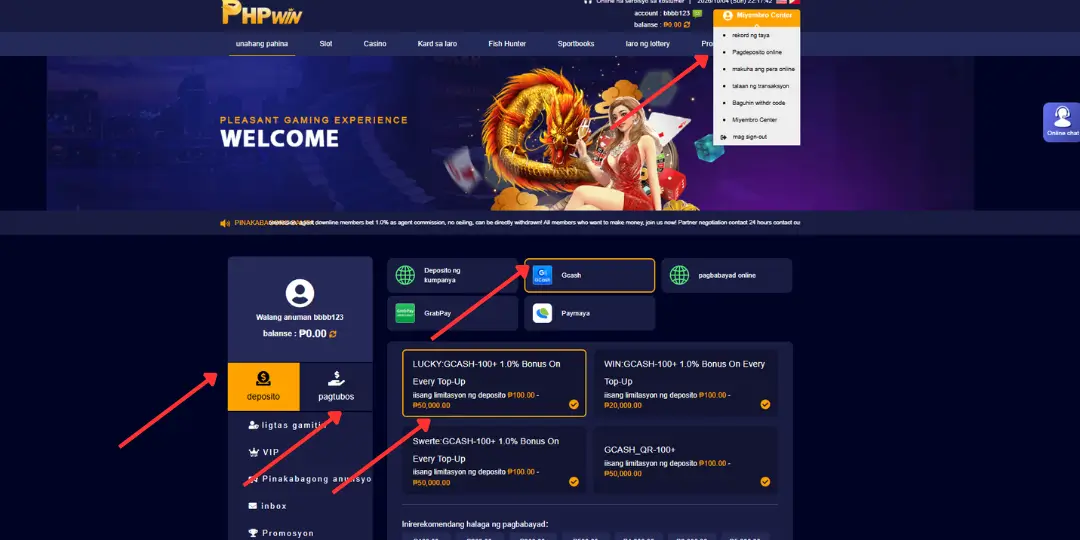
PHPWIN Deposit – How to Make a Deposit
To make a deposit, users generally need to log in to their PHPWIN account and access the Deposit section. Available payment methods will then be displayed based on the account and current payment services.
Step-by-Step PHPWIN Deposit Guide
Step 1: Log in to PHPWIN
Access your PHPWIN account using your registered login details and make sure you are using the correct account.
Step 2: Select payment
From the account area, select Intructions to open the payment post.
Step 3: Choose a Payment Method
Select an available payment option such as GCash, GrabPay, PayMaya, or another online payment method displayed by the system.
Step 4: Enter the Deposit Amount
Enter the amount you want to deposit. If minimum or maximum limits are displayed, make sure the amount meets the stated requirements.
Step 5: Review and Confirm
Before confirming, carefully check the account information, payment method, and transaction amount. Only proceed when all details are correct.
PHPWIN Withdrawal – How to Withdraw
PHPWIN may also provide a Withdrawal / Pagtubos section for users who want to request a withdrawal from their account balance.
The withdrawal process may require users to select an available receiving method and provide the relevant payment information.
PHPWIN Withdrawal Guide
- Log in to your PHPWIN account.
- Select Withdrawal / Pagtubos.
- Check your available account balance.
- Select an available withdrawal method.
- Enter the amount you wish to withdraw.
- Carefully review the receiving account information.
- Submit the withdrawal request and wait for the system to process it.
Processing times may vary depending on the selected payment method, account status, and any verification procedures required by PHPWIN.
Things to Check Before Making a Payment
To help avoid unnecessary payment errors, users should carefully check the following before submitting a PHPWIN Deposit or Withdrawal request:
- Make sure you are logged in to the correct PHPWIN account.
- Check your current account balance.
- Verify the payment or receiving account information.
- Never share your password or security codes with other people.
- Check the applicable transaction limits.
- Review all transaction details before confirmation.
- Keep your transaction reference or confirmation information when available.
- Contact PHPWIN’s official support channel if you experience a transaction issue.
What Payment Methods Does PHPWIN Support?
Based on the payment interface shown, PHPWIN may provide several electronic payment options, including GCash, GrabPay, and PayMaya.
However, the payment methods available to each user can change depending on the current system configuration, account, region, and payment service availability. Therefore, users should always refer to the payment options displayed directly in their PHPWIN account.
Deposit vs. Withdrawal
| Feature | Deposit | Withdrawal |
|---|---|---|
| Purpose | Add funds to an account | Request funds from an account |
| Section | Deposit / Deposito | Withdrawal / Pagtubos |
| Payment Options | Available electronic or online payment methods | Available supported receiving methods |
| Before Confirmation | Check payment method and amount | Check balance and receiving details |
| Processing | Subject to system confirmation | Subject to system processing |
PHPWIN Payment Disclaimer
Disclaimer : This website PHPWIN.BIZ is an independent informational and guide website. We only provide general instructions and educational information about PHPWIN’s payment features, including deposit and withdrawal procedures.
Our website does not provide, process, receive, store, or facilitate any deposits or withdrawals. We do not operate any payment gateway, digital wallet, bank account, or financial transaction service. No money can be deposited or withdrawn directly through this website.
Any actual payment, deposit, withdrawal, account transaction, or financial activity must be completed through the official PHPWIN platform and its available payment channels. Users should independently verify all payment information before completing a transaction.
We are not responsible for payment transactions made through third-party services, incorrect payment information, delays, failed transactions, or changes to PHPWIN’s payment policies and available methods.
Conclusion
PHPWIN Payment provides users with access to deposit and withdrawal options through the payment methods available on the PHPWIN platform. Options such as GCash, GrabPay, and PayMaya may be displayed depending on current availability.
This website is intended only as an informational guide to help users understand the general payment process. We do not accept or process any deposits or withdrawals on this website. Always verify transaction details directly through the official PHPWIN platform before proceeding.

Chemin Rou is the CEO of PHPWIN Casino, based in Manila, Philippines, with 8 years of experience in the online entertainment industry. He focuses on platform development, user experience, and providing clear, reliable information to help users explore PHPWIN features, promotions, and gaming guides.